Table of Contents
Sending from the Pipeline #
- Access the position pipeline from the action menu.
- For the desired candidate, choose Action followed by Email.
- Choose Template to select your Pipeline Letter.
- Choose any additional settings.
- Use email to compose your email, enter your subject and complete your To/CC/BCC.
- Use send options to send as a meeting request, request a return receipt, and choose a level of importance. You can also choose to include a Feedback link, mark as private email, or combine all attachments into a single PDF document. The final option here allows you to send this email to a rollup list by selecting that rollup from the dropdown.
- Attachments allows you to add files stored locally on your machine.
- PCR Files allows you to choose global, name, position, or company attachments related to the record.
- Select Send to send your email.
Sending from the Interview #
- Access the position pipeline from the action menu.
- For the desired candidate, choose Action followed by Add.
- Schedule your interview following your interview scheduling procedure.
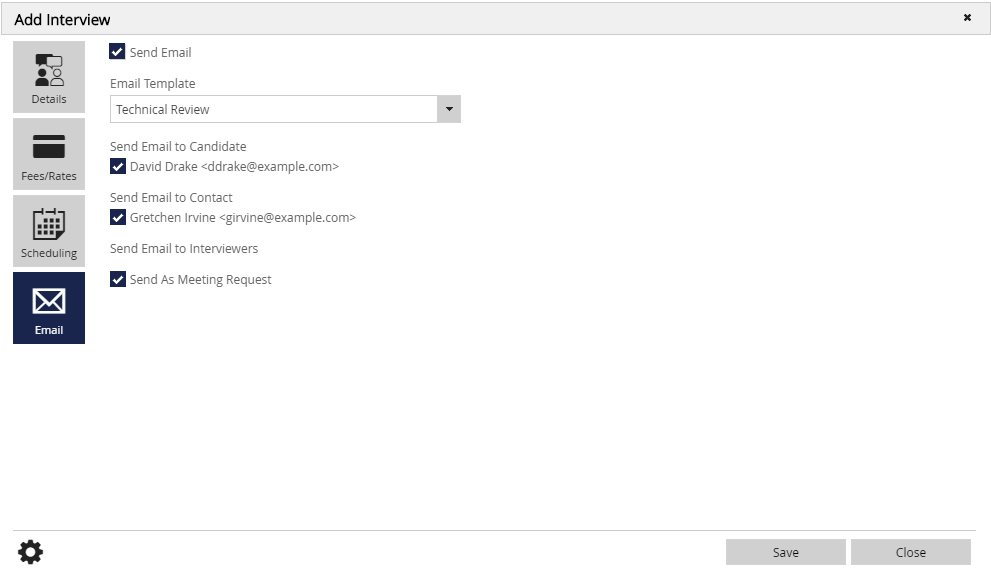
- Select the Email charm.
- Select the option for Send Email (The email will not send otherwise).
- Use the Email Template dropdown to select the appropriate template.
- Choose who you would like to receive this email: candidate, contact, and/or interviewers.
- Select to Send as Meeting Request if desired.
- Save.